Size each branch
A refactor across a monorepo gets 16 vCPU; a docs fix gets 2. The size you pick is the machine you get — one environment, one instance, no bin-packing.
Disposable cloud dev environments
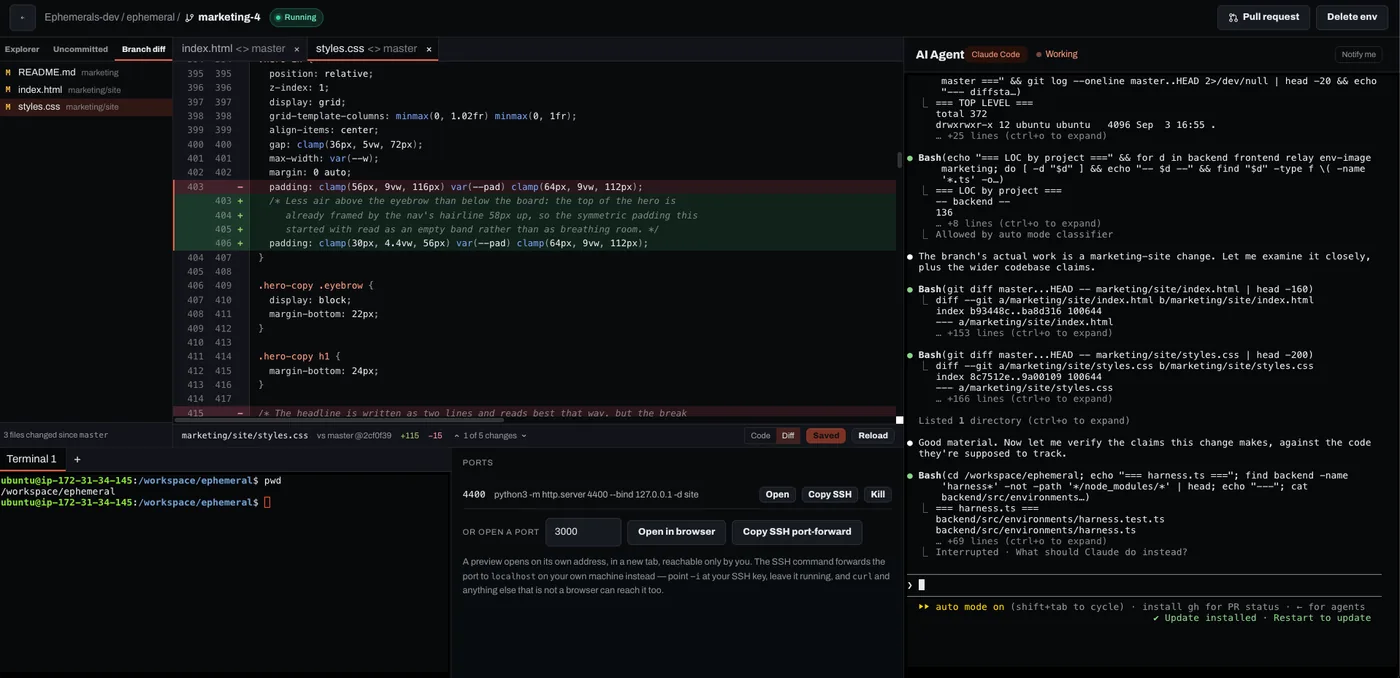
Run your own agent, review its code, spin up your stack, preview your app — all in one secure remote box.
No credit card required
Stock agent, your subscription or API key — nothing of ours in between.
Zero inbound ports
Nothing on the internet can open a connection to your box.
One instance per branch
Dedicated, never shared, sized from 2 to 16 vCPU.
Three ways in
Browser terminal, SSH, and a preview URL per port.
Gone when the PR merges
The machine is reaped and its secrets go with it.
Parallelism
One machine per branch is what makes ten agents at once an ordinary Tuesday. No stashing, no port already in use, no waiting for one agent to finish before you start the next — and nothing running on your laptop competing for its fans.
A refactor across a monorepo gets 16 vCPU; a docs fix gets 2. The size you pick is the machine you get — one environment, one instance, no bin-packing.
Environments belong to the organization, not to whoever pressed the button. A colleague can open the branch that is already running instead of starting a second box on the same work.
The agent pushes an event when it moves, so the file tree and the diff refresh themselves. Nothing polls, and a missed event costs a stale second, not a wrong view.
The agent
What boots on the machine is a bare-bones Claude Code — the same thing you run on
your laptop, not a fork of it, not a wrapper around it, and not some agent of ours
you would have to learn and then be stuck with. It reads the CLAUDE.md
in your repository, runs your MCP servers and answers your own slash commands. The
only thing we add is a hook that tells the workspace when the agent moves, which is
how the file tree and the diff refresh themselves.
Bring the Claude subscription you already pay for — Pro or Max — or your own
API key. Paste the token when you launch, or leave the box empty and run
/login in the terminal the way you would on any new machine. Save a
key once as an organization secret and every environment after it comes up with
it already in place.
The agent talks to Anthropic straight from your instance. We do not proxy your prompts, resell you tokens or take a cut of them: you pay us for a seat and for machine time, and your agent bill stays between you and your provider.
$ claude
Claude Code · /workspace/checkout
● signed in — your Max plan
>
The harness is a choice you make per environment, at launch, because the agent you want for a week-long migration is not always the one you want for a typo. Claude Code runs today; the other two sit in the same picker, greyed out until they are real rather than absent until they ship.
And it is your machine, with root on it. Install any other agent you like and it runs — nothing here is locked to a harness we happen to sell.
Coding agent
Availability
The agent runs in a tmux session on the instance, not in your browser
tab. Shut the lid, lose the wifi, close the window — the pane keeps running on the
box. Open the workspace again and you reattach to it, scrollback intact.
$ tmux new-session -A -s agent
[detached — client gone 21:14]
● claude
running 47 test files…
wrote src/orgs/invite.ts
wrote src/orgs/invite.test.ts
Access
Start a dev server on any port and Ephemerals hands you a URL for it. WebSockets and hot reload are proxied, so the page updates as the agent edits the file — and previews live on their own registrable domain, so a page inside one can never reach the app's session cookie.
Your keys, your dotfiles, root on the machine. Forward a port with
ssh -L and the environment's localhost is your localhost. Public
keys only — passwords are refused outright, and the environment itself still
has no port open to the world.
$ ssh 562ae1d6@ssh.ephemerals.dev
ubuntu@ephemeral:~/checkout$ git status
On branch fix/stripe-webhook-retry
$ ssh -N -L 3000:localhost:3000 562ae1d6@ssh.ephemerals.dev
Security
An agent with a shell is an agent with your SSH keys, your browser profile and your company's whole checkout. Give it a machine that holds none of that, that nobody can connect to, and that you can throw away.
Isolated
Each environment is one EC2 instance in a security group with no inbound rules at all. Every terminal, forward and preview rides a channel the box opened outward through AWS Systems Manager.
Your secrets are sealed with a KMS data key under an encryption context, so a row lifted into another account does not decrypt — it errors. The instance role holds no KMS grant, and no secret value is ever returned to a browser.
Auditable
Your role is never baked into the cookie; it is re-read from the database on each guarded request. Removing a member takes effect on their next call, not at the end of a seven-day session.
Support access is a signed, read-only session that names the real actor inside the token, with a required reason and a durable record of who, whom, why and when. Commits are authored from the session that made them.
Ephemeral
A machine exists for one branch. When the pull request merges, it is reaped and the secrets scoped to it are deleted with it.
A bad afternoon costs you one disposable box, not your workstation. There is no long-lived host accumulating state, credentials and everyone's half-finished branches.
Review
Read the diff in the workspace, commit, push the branch, open the pull request — without leaving the tab. The commit is authored by the person who pressed the button, resolved per request, so a colleague picking up a running branch does not sign your name to it.
src/billing/webhook.ts
- if (event.type === 'invoice.paid') {
+ if (isTerminal(event.type)) {
+ await claimBeforeReport(event.id);
src/billing/webhook.test.ts
+ it('ignores a replayed event', async () => {
Coming soon
The workspace is a browser tab and the agent is a process on a machine — neither of them needs you sitting in front of it. Start a branch from your phone on the way in, or from the thread where somebody reported the bug.
Pricing
Compute is metered per second from the moment an environment is created until the moment it is deleted.
Per seat
$10 / user / month
Billed monthly, counted from the members of your organization. Everyone in the org can see and use every environment in it.
Per machine hour
| Size | Memory | Per hour |
|---|---|---|
| 2 vCPU | 4 GB | $0.18 |
| 4 vCPU | 8 GB | $0.36 |
| 8 vCPU | 16 GB | $0.72 |
| 16 vCPU | 32 GB | $1.44 |
Charged by the second, so a nine-minute environment costs nine minutes.
Free tier
30 minutes a day
One 2 vCPU / 1 GB machine
Sign in with GitHub, pick the repositories you want to work on, and start one. It boots with the toolchain and the agent already on it.
Start FreeWe only ask for the repositories you pick.